When does it launch?
Q4 2026, as a free preview: a public download with all of Pro unlocked at no charge
while it runs. Joining the list holds the $79 launch price through the preview and
after it, whenever you buy.
What's the launch price?
Nothing during the preview, then $79 at launch and $119 after. Everyone on the
waitlist gets the launch price whenever they buy, so there is nothing to watch for and no window to miss. The lock has no
expiry date: it holds until you buy, whether that is next month or next year. We honour
it with a discount code sent to the address you signed up with, so it survives a price
rise rather than expiring with one.
What is a context?
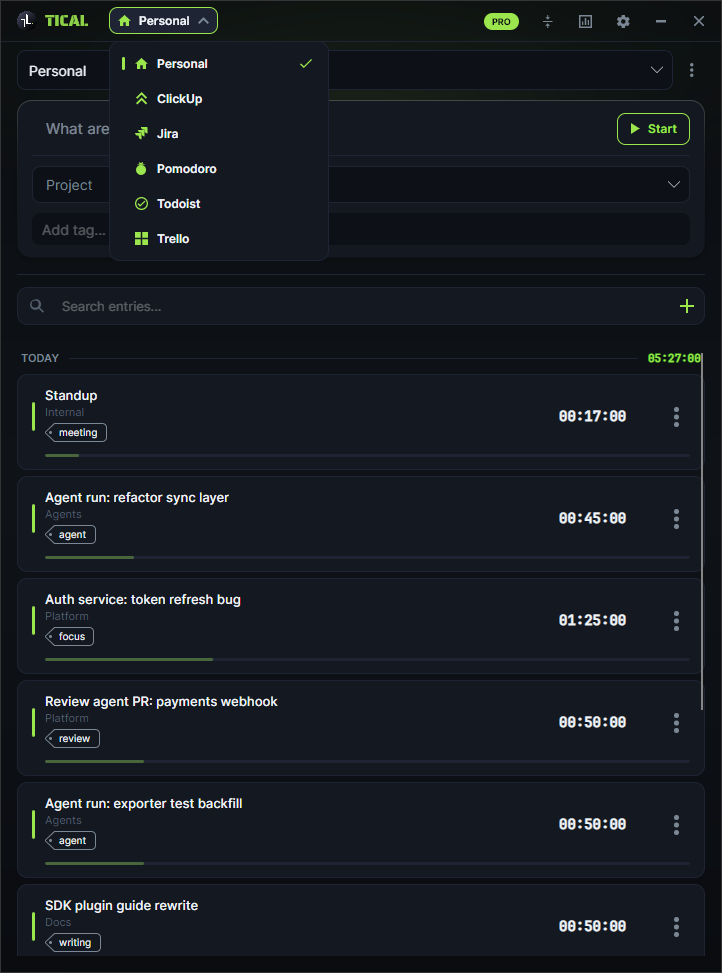
A plugin that teaches Tical one of your tools. It brings its own panel into the
window, its own list of things you can track against - Jira issues, ClickUp tasks,
Trello cards, Todoist tasks - and its own idea of where the hours go when you stop.
Jira, ClickUp, Trello, Todoist and Pomodoro ship with Tical; the SDK behind them is
on nuget.org, so a context for the tool you actually use is a class library rather
than a feature request.
Can I use a context somebody else wrote?
Yes. A context is a .dll you drop next to Tical.exe, and Tical loads it exactly as it
loads ours - there is no store, no review and no key to get. That also means you are
trusting whoever wrote it with whatever it can reach, the same as any other program
you run, so take them from somewhere you would take a program from.
Does Tical work offline?
Yes, all of it. Your license key is signed once and then checked on your own machine,
so the app never needs a connection to keep running - not at startup, not after a
week on a plane, and not on the day our server has an outage.
Is Tical a subscription?
No. Tical Pro is a single payment for a perpetual license, and updates within your
major version are included. There is no renewal, no seat count and no tier above Pro.
Where is my time tracking data stored?
In one SQLite file on your own disk. Nothing is uploaded to us. If you want your
history on a second machine, Pro syncs it encrypted through your own Google Drive
- still never through our servers.
Does Tical run on macOS or Linux?
Not today. Tical is a Windows desktop app: the tray timer and the global
shortcuts both sit on Windows APIs. Tell us on the
feedback page if another platform is what is stopping you.
Does Tical watch my screen or take screenshots?
No. Tical records only the entries you start and stop yourself, or that an agent you
have connected starts and stops for you - and that connection is off by default. It
does not read window titles, log which applications you use, or capture your screen.
While a timer is running it notices that the machine has gone idle, and only so it can
ask what to do with the gap when you stop.
Can Tical log time to Jira, ClickUp, Trello or Todoist?
Yes, with Pro. Pick the issue, task or card in that context, track against it, and
stopping the timer writes the time where the tool keeps it: a worklog on the Jira
issue, a time entry on the ClickUp task, and a comment on the Trello card or Todoist
task, because neither of those has a time field. Pushed the moment you stop or when
you press sync, whichever you set. All four are ordinary plugins built on the public
Tical SDK.
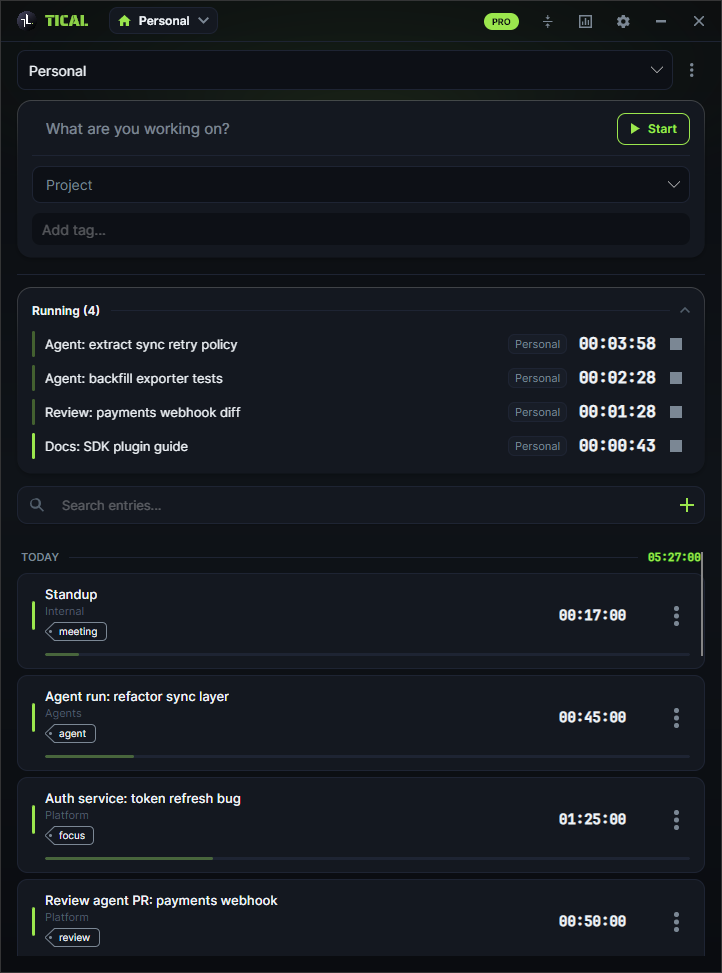
Can I run several timers at once?
Yes, as many as you like, on Free as well - starting one never stops another. Each
run gets its own row with its own clock and its own stop, and the tray tooltip counts
what is running. Free runs them all in Personal, since every other context needs Pro;
with Pro one timer can sit on a Jira issue while another sits on a ClickUp task.
Pomodoro is the exception: its engine is one work-and-break cycle, so it runs a single
timer of its own while everything else carries on beside it.
Can I move my license to a new computer?
Yes - up to two free transfers in any rolling 12-month period. A license is
active on one machine at a time: email us from the address you bought with, we retire
the old key and issue a new one signed for the new machine. The old key stops working;
your entries don't, because they are a file on your own disk. Hardware died and you
are out of transfers? Write to us - genuine failures are handled case by case.
The details are in the terms.
What do I get in the free version?
The timer, with no time limit, no card and no account - one workspace, as many
projects, tags and simultaneous timers as you want, the global shortcuts, compact mode and the agent connection over MCP. What it does
not do is load a context. Jira, ClickUp, Trello, Todoist, Pomodoro and anything built
on the SDK need Pro, and so do export, idle detection and encrypted Drive sync.
Does Tical sync with Toggl or Clockify?
No, and the difference matters. Tical writes CSV files in the column layout Toggl and
Clockify expect for a bulk import, and you upload those there yourself. It never
contacts either service, holds no token for them, and nothing comes back the other
way. Jira, ClickUp, Trello and Todoist are the ones that genuinely connect.
Is there a free trial?
Yes - 14 days of the whole of Pro, and every copy of Tical starts with it. No card,
no account, nothing to cancel. When the 14 days are up Tical settles into the free
edition, which never expires, and everything you tracked stays exactly where it is.
One trial per computer. It starts once the preview ends - until then every copy runs
as Pro anyway.
Is there a refund policy?
Yes. You have 14 days from purchase for a full refund, as long as your license key has
not been redeemed - redeeming it is what starts delivery. Once a key is signed
for your machine the statutory right is gone, but if it genuinely does not work for
you, write to us within those 14 days and we will normally refund you anyway. That is
also what the free edition is for: it never expires, so nobody has to buy blind.
What happens to my entries if my license lapses?
Nothing happens to them. Your entries are a file on your own disk and Tical never
deletes them. A perpetual license does not lapse in the first place, but if you run
a copy no key covers, the free caps apply to what you make from then on and
everything already tracked stays exactly where it is.
Can I use Tical on two computers?
Yes, for $39 rather than a second full license. Add one at
tical.io/second-machine using a code copied from the
computer you already licensed. A second machine is tied to the same Google Drive
account as the first, and Tical re-checks that every time it starts - so both machines
have to be signed in to that one account, and the first has to still be syncing. A
third at once is a full license. Replacing one computer with another is a different
thing again and costs nothing - that is the free transfer above. What travels either
way is your history: Pro syncs it encrypted through your own Google Drive. It copies
the database whole and the newest copy wins, so sync before you switch machines rather
than after. That Google review is still in progress, so you get an unverified-app
screen once when you connect - and Drive sync is off until you switch it on, because
nothing else in Tical needs it.
Does Tical need an installer or admin rights?
Neither. The download is a zip holding one self-contained executable. Unzip it
anywhere you can write, including a folder inside your own profile, and run it.
Nothing is registered and no service is installed - deleting the folder takes
the app with it, and your entries sit in your AppData folder until you delete those
too.
Can I write my own integration?
Yes, and it is the point of the app. Tical.SDK and Tical.SDK.Core are published on
nuget.org, and the Jira, ClickUp, Trello, Todoist and Pomodoro contexts are built on
exactly those two packages - no privileged internal API they get and yours does not.
Point one at
whatever your work runs on, drop the .dll next to Tical.exe, and it appears in the
switcher. The full reference is on the SDK page.
Can an AI agent use Tical?
Yes. Tical has an MCP server built in, off until you switch it on in Settings under
Agents. Claude Code, Claude Desktop, Cursor, Codex CLI or any client that can launch a
stdio server connects by running Tical.exe with --mcp, over a local pipe only your
Windows account can open. The agent can start, pause, resume and stop the timer, log
and correct entries and read reports. It
follows rules you write in plain English, and Tical itself enforces the permission
switches beside them, so anything you turn off is refused however the agent asks.
Agent access is free; whatever needed Pro before - contexts, reports past seven days,
a second workspace - still does when an agent asks for it.
 Tical
Tical